
Epic Minigames Script [Auto Win/Inf Jump]
Epic Minigames is built around short challenges where timing, movement, and practice decide who wins. The official Roblox page describes it as a large collection of minigames where players earn coins and level up by winning rounds.
loadstring(game:HttpGet("https://raw.githubusercontent.com/SlamminPig/rblxgames/main/Epic%20Minigames/EpicMinigamesGUI"))()
That competitive setup is why some players search for an Epic Minigames script. These scripts usually promise auto-win, infinite jump, faster movement, teleportation, and other shortcuts. They may look convenient, but they are unauthorized tools that can put your Roblox account and computer at risk.
What Is an Epic Minigames Script?
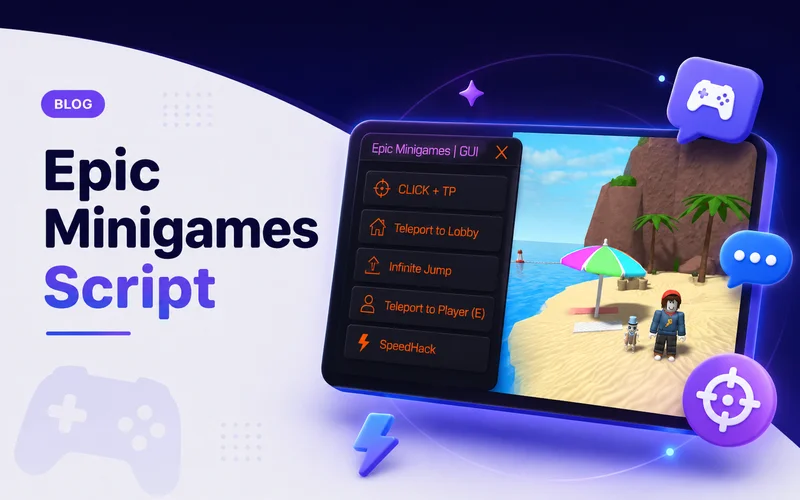
An Epic Minigames script is third-party code designed to change normal gameplay. It is usually run through a separate program known as an executor rather than through Roblox’s approved tools.
Once loaded, it may display a menu containing different cheats. Some features target specific minigames, while others change the player’s movement across the whole experience. Unlike code made legitimately in Roblox Studio, an exploit script is used to give abilities that regular players do not have.
Common Features
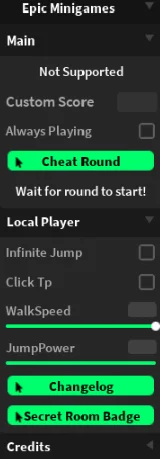
Cheat Round and Auto-Win
Cheat Round is often the main advertised feature. It may instantly complete supported rounds, prevent the character from being eliminated, or trigger a win without completing the normal objective.
Support varies by round, and game updates can break the feature at any time.
Infinite Jump
Infinite Jump allows the character to keep jumping while already in the air. Players may use it to reach high structures, escape hazards, or move outside the intended play area.
It is also easy to notice. A character repeatedly jumping above the map clearly does not look like normal gameplay.
WalkSpeed and JumpPower
WalkSpeed and JumpPower options change how quickly or how high a character moves. Script menus commonly present them as adjustable sliders.
Extra speed may help in races or survival rounds, but extreme settings can make movement difficult to control and obvious to other players.
Click Teleport
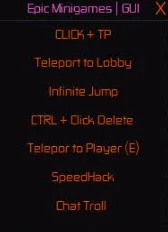
Click TP moves the player directly to a selected location. It may be used to cross obstacles, avoid danger, or reach safe areas without following the intended route.
Teleporting is one of the most visible script features, making reports from other players more likely.
Automated Actions
Some scripts claim to automate minigame-specific actions, such as clicking buttons, selecting tiles, avoiding attacks, or targeting nearby opponents.
These features normally work only in selected rounds. Epic Minigames has many different objectives, so a script that works in one challenge may fail in another.
Is It Safe?
No exploit script or executor should be treated as completely safe. Roblox warns that many supposed exploits are scams used to distribute malware, keyloggers, and phishing software capable of stealing passwords or other personal information. You can read Roblox’s warning on its Cheating and Exploiting page.
A short script can also download extra code from another location. That file may later be changed, meaning the code you run tomorrow may not be the same code reviewed today.
Fake buttons, redirects, browser notifications, and modified installers add more risk. Never enter your Roblox password into an executor or script page, and do not disable your security software because a download tells you to.
Can You Get Banned?
Yes. Roblox states that cheating and exploiting violate its rules and can lead to account deletion. It also says that modified apps or software that changes how Roblox works is against its rules. Roblox explains this further on its Anti-cheat Messages page.
Even when a video calls a script “undetected,” other players can still report suspicious behaviour. Instant wins, impossible jumps, invulnerability, extreme speed, and teleportation are usually easy to recognize.
An experience creator may also ban a player from a specific game. Roblox confirms that experience-level bans can block access to that game while leaving other platform features available.
Why Exploiting Hurts the Game
Epic Minigames depends on everyone following the same rules. When one player becomes invulnerable or finishes a team objective automatically, the result is no longer fair.
Scripts also remove the challenge that makes the game enjoyable. Instant victories may feel exciting at first, but they soon become repetitive because the player is no longer learning maps or improving their reactions.
Safer Ways to Win More Rounds
The best approach is to learn how each minigame works. Watch where hazards appear, avoid crowded groups in obstacle rounds, and focus on safe positioning during survival challenges.
Reducing Roblox’s graphics settings may help if lag affects your timing. You can also practise camera control, movement, and jumping in the lobby.
Normal gameplay guides are another good option. They teach useful strategies without risky downloads and continue to help after updates.
Final Verdict
An Epic Minigames script may advertise auto-win, Cheat Round, Infinite Jump, Click TP, WalkSpeed, JumpPower, and automated actions. These tools offer unfair advantages, but they also bring real risks, including malware, stolen information, reports, and bans.
Skipping exploit scripts is the safer choice. You protect your account, avoid suspicious downloads, and keep the game fair for everyone.
Frequently Asked Questions
It changes normal gameplay by offering unauthorized features such as auto-win, teleportation, infinite jump, or increased movement speed.
Usually not. Most scripts support only selected rounds and may stop working after updates.
A fake or malicious executor can steal passwords, browser data, session cookies, or other personal information.
No. “Undetected” is a promotional claim, not a guarantee. Players can still report suspicious behaviour, and detection methods may change.
Use the official Epic Minigames page on Roblox instead of third-party script or download websites.